

Let's say you are like me and you have something like Pi-hole or AdGuard on your network to provide DNS filtering/blocking as well as an IoT or untrusted network/VLAN on your UniFi gateway and you want to ensure all DNS queries are sent to your Pi-hole/AdGuard instead of maybe something like hardcoded DNS. We sometimes see hardcoded DNS in things like smart lights or Google/Amazon devices. We can set up a NAT rule to translate the destination of that DNS request to your Pi-hole/AdGuard instance to ensure all plain DNS requests are being filtered by your DNS filtering setup. Side note: this only works for DNS requests sent to an IP address and NOT DNS over HTTPS or DNS over TLS.
Head to Settings - Routing - NAT and click "Create Entry"
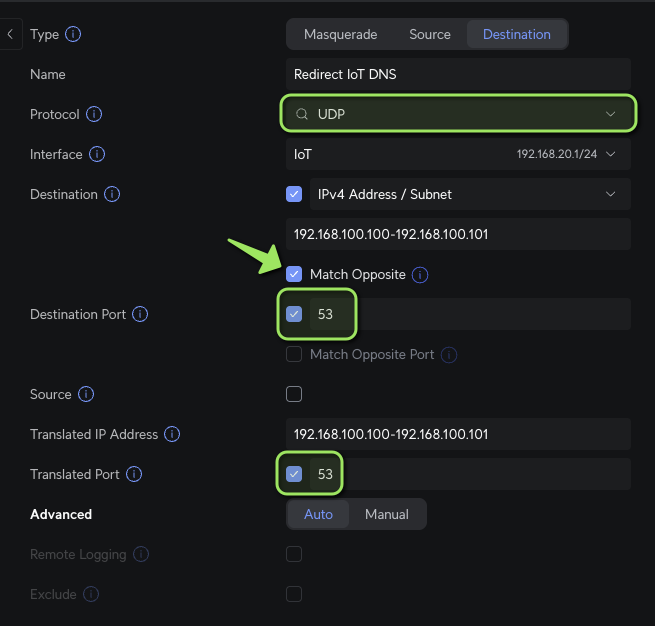
Choose "Destination" as the Type and reference the screenshot below for setup:
IMPORTANT!
I emphasized the sections that are required.
Select the proper network under "Interface", since our rule is in Destination mode, we will be translating or "redirecting" DNS requests to anything other than what is listed in the "Translated" sections.
Set the Destination to the IP(s) of your internal DNS servers. Notice how I put an arrow on the "Match Opposite" checkbox under Destination. This is crucial as it will cover anything not destined for your internal DNS servers.
Make sure to duplicate the IP(s) of your internal DNS servers in the "Translated IP Address" section.